
KingSpec M2 NVMe SSD 512GB 128GB 256GB Hard Disk NVMe PCIe 3.0 1TB 2TB Internal Solid State Drive For HP Laptop Computer
512GB NVMe SSD
HK$1,778.00 HKD
Angebotspreis
HK$1,778.00 HKD
Normaler Preis
HK$0.00 HKD
KingSpec M2 NVMe SSD 512GB 128GB 256GB Hard Disk NVMe PCIe 3.0 1TB 2TB Internal Solid State Drive For HP Laptop Computer
HK$1,778.00 HKD
Angebotspreis
HK$1,778.00 HKD
Normaler Preis
HK$0.00 HKD
✔ I have reviewed the product version and details
Abholung derzeit nicht verfügbar
SPECIFICATIONS
Application: Desktop,Laptop
Brand Name: KingSpec
Bus Type: PCIe 3.0x4
Capacity: 128GB 256GB 512GB 1TB 2TB
Certification: CE,FCC,RoHS,KC
Choice: yes
Controller: SM2263XT/RT5765DL/MAP1002 and etc.
Cooling Fin: Yes
Dimensions: 80mm length*22.0mm wide*3.5mm height(error +/-0.5mm)
High-concerned chemical: None
Interface Type: PCI Express
MTBF: 1 million hours
Max Sequential Read: 3500
Max Sequential Write: 3000
NAND Flash: 3D TLC/3D QLC in Ramdon
Nand Flash Type: TLC
Origin: Mainland China
Package: Yes
RGB: No
Size: PCI-E
Style: SSD
Transport Protocol: NVME
Type: Internal
Warranty: 3 years

Descriptions:
>>Product name: NVMe M2 SSD 2280
>>Interface protocol: NVMe PCIe 3.0X4
>>Controller: SM2263XT/RT5765DL/MAP1002 and etc.
>>Nand Flash Type: TLC/QLC
>>Physical dimension: 80(L)X22(W)X3(H)mm
>>SupportCapacity: 128GB 256GB 512GB 1TB 2TB
>>Max Sequential Read: 3400Mbps
>>Max Sequential Write: 3000Mbps
>>Input voltage: 3.3V±5%
>>Storage temperature: 0~70℃
>>Warranty/support: 3-year warranty with free technical support
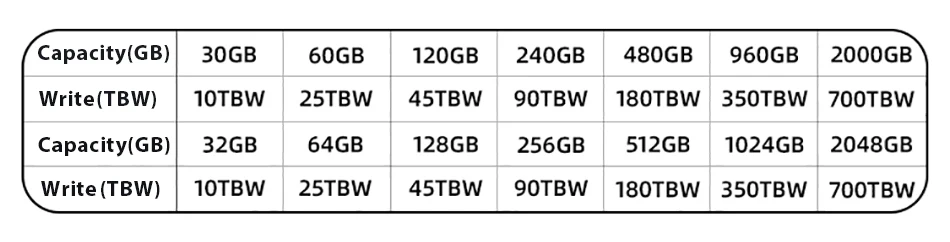
>>TBW of Different capacity: 300TBW [512GB] 600TBW [1TB] 1200TBW [2TB]

Feel free to message us to make sure your laptop/desktop is compatible.
M.2 NVMe SSD NEW UPGRADE-PCIe 3.0*4
1.Idea for gamers, overclockers, video editors and PC enthusiasts
2.Heat Spreader Label——Reduces Tempreture BetterM.2 NVMe PCIe 3.0 SSD 2280 offers a variety of capacities for you to choose (128GB 256GB 512GB, 1TB, 2TB), which to meet your need for different scenarios.
3.NVMe M.2 SSD 2280 is suitable for portable devices such as desktop, all-in-one, and notebebook devices, compatible with Windows, Mac OS, Linux operating systems.
Package include:
>>1 X SSD NVMe M2 PCIe3.0
>>1 X Package box

FAQ
Q: Why can't we find solid state drive and read/write data?
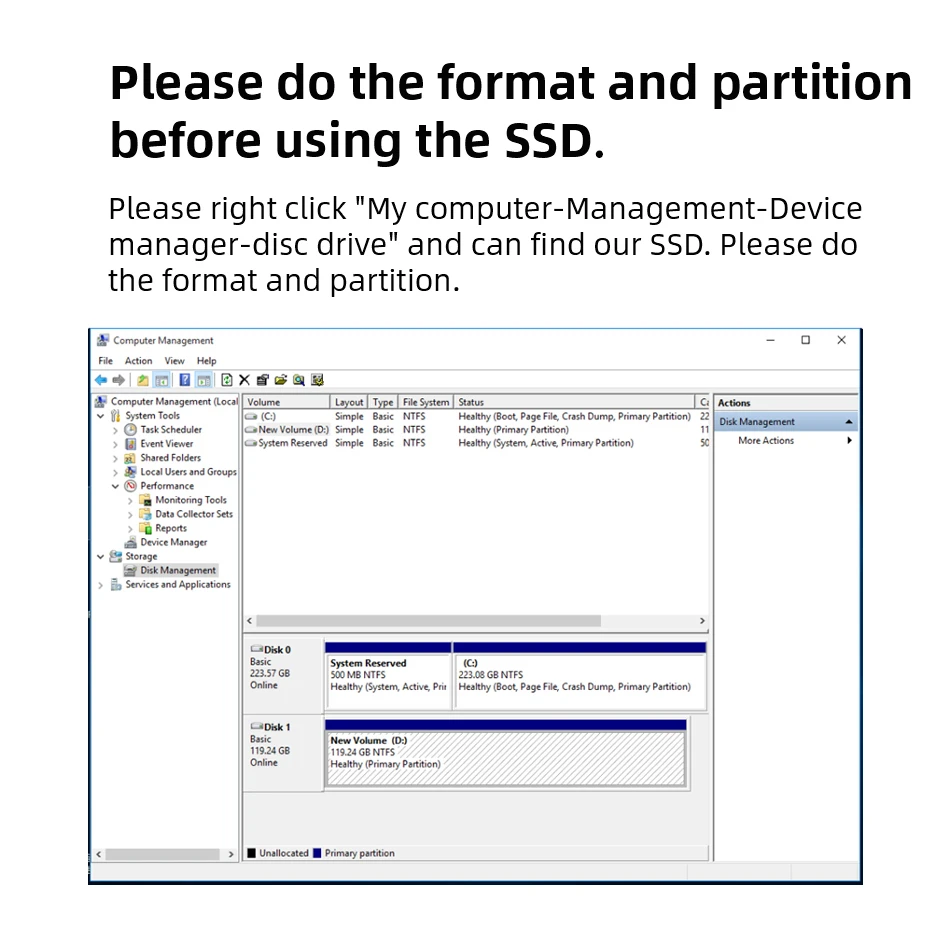
A: The new SSD generally need to be formatted in Disk Management.In Disk Management, select"Create and Format Hard Disk Partition", you will find it. If "Not Initialized" is displayed, right clink on the drive and select"Initialize Disk".
Q: Why is the speed test result different from the description?
A: Our test data is just for reference, our test results related to manyfactors, such as the status of hard disk, slot interface type, computer hardware grape, computer system, test platforms, and test software and so on. So, our speed test result will be different with you, hope you can understand.
Q: How to format SSD and achieve 4K alignment?
A: Win7 or higher version OS is recommended due to'Disk Management Formatting function is built in the systems. We recommend NTDS disk partition format and DISKGENIUS tool to make drive partition.
PS: Use as SSD Benchm ark to check if SSD has complied with 4K Alianment and already been under AHC model. Otherwise SSD write/read speed performance and response time will be affected.
Q: Why the capacity of hard disk displayed in the computer will be less?
A: The difference in calculation between the manufacturer and your PC, please google "storage product capacity" for more info. PC defines 1GB = 1.073741824 billion bytes, while the market defines 1GB = 1.00 billion bytes100% real capacity, via H2testw. Storage device conversion formula: nominal capacity X 0.93 = actual capacity. Capacity Notes: 64GB=approx. 55GB 120GB=approx.111GB 128GB=approx. 119GB 240GB=approx. 223G 256GB = approx.238G 480GB = approx. 446GB 512GB = approx. 476GB 960GB =approx.892GB1TB = approx. 930GB 2TB = approx. 1800GB
Before you use:
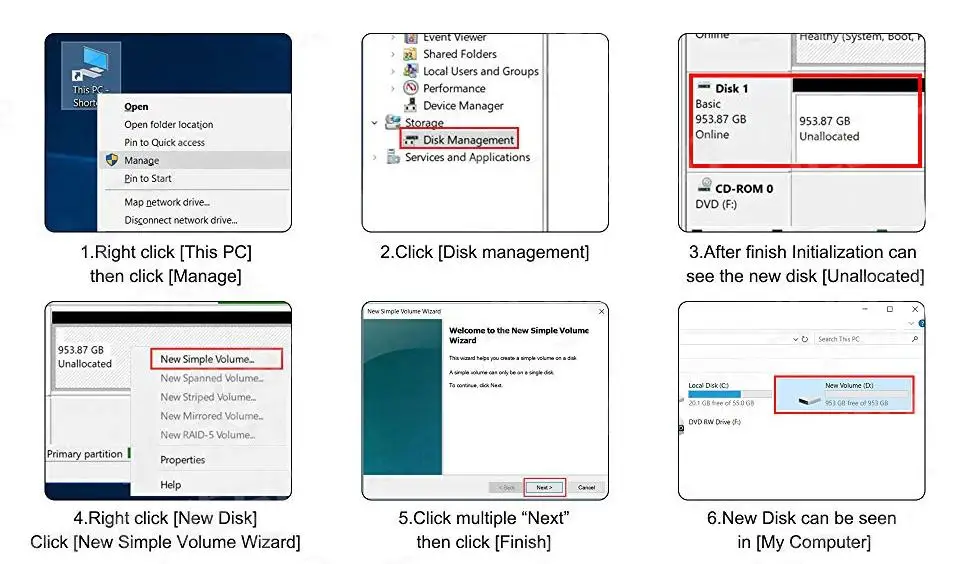
For new SSD, please finish disk initialization according to the following steps.
1. Open Start. Search for "Create and format hard disk partitions" and click the top result to open the Disk Management console.
2. Right click "Computer" - "Manage" - "Disk Management".
Find your unallocated disk, right click "Unallocated", and choose "New Simple Volume Wizard". So then your SSD can be detected.



Rechtliche und politische Links


Real Unboxing
Warehouse Packing
Shipping Orders Daily
Auf der Suche nach mehr?
Abonnieren Sie unsere E-Mails
Erfahren Sie als Erster von neuen Kollektionen und Sonderangeboten.